LED Blinking Project using Arduino
The LED blinking project is the first and most basic Arduino project. It helps beginners understand how Arduino outputs work and how to control electronic components using code.
BeginnerComponents Required
- Arduino Uno (or compatible board)
- LED
- 220Ω Resistor
- Breadboard
- Jumper Wires
- USB Cable
Circuit Connections
Follow the steps below to connect the LED with the Arduino board. Make sure the Arduino is not connected to USB while wiring.
- Insert the LED into the breadboard. The longer leg (anode) is positive.
- Connect a 220Ω resistor to the shorter leg (cathode) of the LED.
- Connect the other end of the resistor to GND on Arduino.
- Connect the longer leg of the LED to digital pin 13.
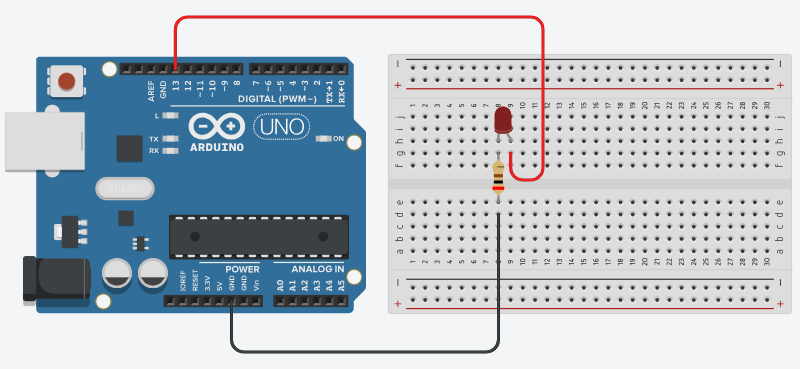
here is the circuit diagram for reference.
Arduino Code
/*
    Project: LED Blinking using Arduino
    Description: This project demonstrates how to blink an LED using an Arduino board. The LED will turn ON for 1 second and then OFF for 1 second, creating a blinking effect.

   Components:
     - Arduino Uno
     - LED
     - 220Ω Resistor
     - Breadboard
     - Jumper Wires
     - USB Cable
   Author: Circuit Creation RN

*/

// This code turns an LED on and off repeatedly, creating a blinking effect.

int ledPin = 13;

void setup() {
  pinMode(ledPin, OUTPUT);
}

void loop() {
  digitalWrite(ledPin, HIGH);
  delay(1000);
  digitalWrite(ledPin, LOW);
  delay(1000);
}
Upload the Code
- Connect the Arduino board to your computer using the USB cable.
- Open the Arduino IDE and paste the code into a new sketch.
- Select the correct board and port from the Tools menu.
- Click the Upload button.
Code Explanation
Let us understand how the Arduino code works step by step. This will help you modify the project later and build more projects.
Declaring the LED Pin
int ledPin = 13; stores the pin number where the LED is connected.
Using a variable makes the code easier to read and change.
setup() Function
The setup() function runs only once when the Arduino starts.
Here, we tell Arduino that the LED pin will work as an output.
loop() Function
The loop() function runs continuously.
Inside this loop, the LED is turned ON and OFF repeatedly, creating the blinking effect.
delay() Function
The delay(1000) function pauses the program for 1000 milliseconds
(1 second). Changing this value will change the blinking speed.
Common Mistakes & Troubleshooting
- LED does not glow: Check the LED direction. The longer leg should be connected to the Arduino pin.
-
No blinking:
Make sure the correct pin number is used in the code.
If you are using another pin, update
ledPin. - Wrong resistor value: Use a 220Ω or 330Ω resistor. Very high or very low values may cause issues.
- Upload error: Select the correct board and COM port from the Arduino IDE Tools menu.
- LED very dim: Check loose connections on the breadboard and jumper wires.
What You Learned
- How to use an Arduino pin to control an output (LED).
- Understanding
setup()andloop()functions. - Using
digitalWrite()to turn components ON and OFF. - How to use
delay()for timing in Arduino programs. - Building a simple electronic circuit with LED, resistor, and breadboard.